
Why Are Your Business Emails Going to Spam? Diagnose the Problem Before You Send Again
Your campaign can have a strong offer, polished copy and a healthy list and still fail if inbox providers do not trust the sender, the message or the sending behavior. Here is how to find the real cause, with free checks you can run today, before you launch another campaign.
If you're asking “why are my emails going to spam?”, the answer is rarely one isolated mistake. Deliverability depends on a chain of technical, reputational and behavioral signals that work together before and after an email reaches the recipient.
You spend hours writing an email. You clean up the subject line, check every link and finally hit send. Then the results arrive: unusually low engagement, missing messages, subscribers who cannot find the email, or tests landing directly in spam.
The tempting response is to rewrite the email and send again. But if the real issue is domain authentication, list quality or sender reputation, changing three words in the subject line will not solve it.
Why are my emails going to spam? In most cases, business emails go to spam for one of six reasons:
- SPF, DKIM or DMARC is missing, broken or not aligned with your From domain.
- Your domain or sending IP has a weak reputation.
- The list contains old, invalid or unconsented contacts.
- Too many recipients mark your emails as spam. Google asks senders to stay below 0.1% and never reach 0.3%.
- The message does not match what people expected when they subscribed.
- Automations send too often, or send overlapping messages.
Check authentication first. It is the quickest cause to confirm and, since Gmail, Yahoo and Outlook tightened their sender rules, one of the most common.
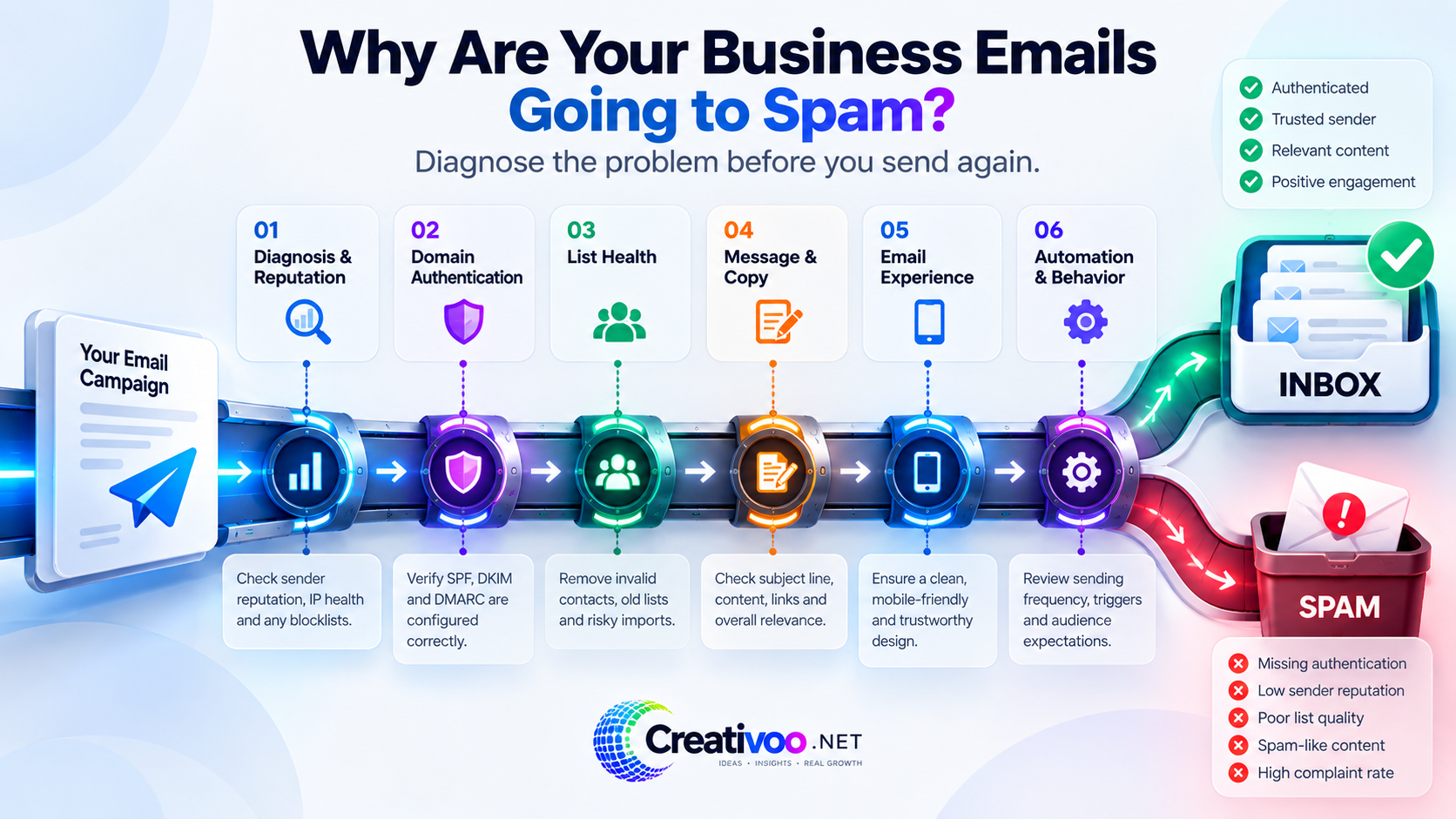
Why Are My Emails Going to Spam? Run These Six Checks First
Before rebuilding your campaigns or paying for help, collect a few basic signals. You are looking for evidence, not guesses. Most of these checks take a few minutes and cost nothing.
Do not judge deliverability from one personal inbox. Compare what happens across Gmail, Outlook, Yahoo and any other accounts you have.
In Gmail, open a message you sent, click the three dots and choose “Show original”. SPF, DKIM and DMARC should all say PASS.
Look for old contacts, bought or imported lists, repeated bounces or subscribers who never explicitly asked for your messages.
A technically valid email can still damage your reputation when recipients do not want it and report it as spam.
Google Postmaster Tools shows your Gmail spam rate. A free blocklist lookup shows whether your domain or IP has been listed.
A new email platform, a sudden jump in volume, a new domain or a large import often explains when the problem started.
How to Check Why Your Emails Are Going to Spam (Free)
These tools will not fix anything on their own, but they tell you where to look. Start at the top row and work down.
| What to check | Free tool | What “good” looks like |
|---|---|---|
| Authentication on a real email | Gmail “Show original” | SPF, DKIM and DMARC all show PASS for your sending domain. |
| DNS records | MXToolbox SuperTool | One SPF record that includes every service sending for you, plus a published DMARC policy. |
| Gmail spam rate and reputation | Google Postmaster Tools | User-reported spam rate below 0.1%. Google treats 0.3% or higher as a serious problem. |
| Blocklists | MXToolbox Blacklist Check | Your domain and sending IP are not listed on major blocklists. |
| A full test send | Mail Tester | A high score with no failed authentication and no broken unsubscribe link. |
The Email Deliverability Control Center
Think of inbox placement as a sequence of six checkpoints. A weakness at one checkpoint can undermine everything that follows.
The technical side matters more than it used to. Since February 2024, Gmail requires every sender to personal Gmail accounts to authenticate with SPF or DKIM, and has stricter rules for bulk senders. Yahoo has similar requirements, and since May 2025 Outlook applies the same standard to high-volume senders.
Practical takeaway: inbox placement is not controlled by one magic setting. Authentication, reputation, recipient behavior and sending practices work together.
Diagnose First: Find Out Why Emails Go to Spam Before You Change Anything
Deliverability problems often trigger random fixes: rewrite the subject line, change the template, switch sending time, remove a few links, then send again. That creates activity without producing a diagnosis.
A better starting point is to work out whether the evidence points toward authentication, domain or IP reputation, blocklists, sending infrastructure, bounce patterns, complaint behavior or something else. Otherwise you can spend days polishing the visible email while the actual problem sits underneath it.
Are multiple campaigns affected? Did the problem appear suddenly? Do Gmail and Outlook behave differently? Have you checked authentication and reputation, not only open rates?
If you cannot isolate the failure point, start with an audit rather than making several unrelated changes at once.
If the first problem is simply not knowing why delivery has deteriorated, Harlan offers a deliverability audit covering areas such as authentication, reputation, infrastructure and risk signals.
SPF, DKIM and DMARC: Is Your Domain Proving the Email Is Really Yours?
SPF, DKIM and DMARC are not decorative DNS acronyms. They let receiving systems verify who is allowed to send mail for your domain and whether the message lines up with the domain the recipient sees.
- SPF lists the servers allowed to send email for your domain.
- DKIM adds a signature that proves the message was not changed on the way.
- DMARC tells inbox providers what to do when SPF or DKIM fails, and checks that they match your From domain.
Google requires SPF or DKIM for everyone sending to personal Gmail accounts. Senders of more than 5,000 messages a day to Gmail must have SPF, DKIM and DMARC, with alignment (Google sender guidelines). Google also says that a domain which reaches that volume once is permanently treated as a bulk sender.
Authentication gets messy when several services send for the same business: your email platform, CRM, online store, booking tool or help desk. A record that looks correct at first glance may not cover every legitimate sender, and a second SPF record breaks SPF entirely.
List every system that sends email using your domain. Then check that SPF, DKIM and DMARC exist and that they pass on real messages from each one.
Correct authentication and alignment problems before assuming your next campaign needs a creative overhaul.
If your diagnosis points toward domain authentication, Nouman's service focuses specifically on email deliverability configuration involving SPF, DKIM and DMARC.
List Health: Why Old or Unconsented Contacts Send Your Emails to Spam
A large database is not automatically a valuable email audience. Old addresses, invalid contacts, repeated bounces and people who never expected the message can turn apparent reach into a deliverability liability.
Mailbox providers watch how recipients react. Google advises senders to email people who want their messages and to monitor complaints and reputation, rather than treating list size as the measure of value.
This is why list quality is not just housekeeping. It shapes the signals you generate every time you send.
Look at where contacts came from, how old inactive segments are, bounce patterns, complaints and whether subscribers clearly opted in to this type of message.
Remove or suppress invalid contacts, stop mailing people who have not engaged in months, and improve how new subscribers join.
If the evidence points toward list hygiene, this service focuses on validating and cleaning email lists before those addresses become part of another campaign.
Email Content: When the Message Gives People Reasons to Ignore It
Once the technical foundations and audience quality are reasonably healthy, the message itself deserves scrutiny. The goal is not to hunt for a mythical list of forbidden “spam words”. Modern filters weigh reputation and recipient behavior far more than individual words.
Instead, examine the gap between expectation and message. Does the sender name make sense? Does the subject line honestly describe the email? Is the offer relevant to why the person subscribed? Does the body feel useful, credible and consistent with the brand?
A message that keeps disappointing recipients produces exactly the behavior you want to avoid: deletion, disengagement, unsubscribes and spam complaints.
Compare the promise at signup with what you actually send. Review subject lines, opening lines, offer clarity, frequency and the reason someone has to keep reading.
Improve relevance and clarity rather than trying to “trick” a spam filter with cosmetic wording changes.
If infrastructure is healthy but the emails themselves are weak, Michelle's email copywriting work can support welcome, nurture, launch or sales sequences with a clearer conversion-focused message.
Email Design: Delivered to the Inbox but Difficult to Use
Deliverability and usability are different problems, but they meet in the subscriber's inbox. A cluttered template, poor mobile layout, tiny text, unclear buttons or inconsistent rendering can weaken engagement even when the message reaches the inbox.
The distinction matters. If authentication passes and delivery looks normal but people still do not interact with the email, investigate the experience rather than continuing to blame spam filtering.
Test the message on mobile and desktop. Check hierarchy, readability, button visibility, reliance on images and whether the layout still makes sense when images are blocked.
Use a responsive template that makes the message easy to scan and the intended action obvious.
For businesses using Klaviyo that need a stronger visual email experience, Agnes offers marketing email template design and build services.
Automation and Frequency: The Wrong Message at the Wrong Moment
Automation makes email scalable, but bad automation scales mistakes too. Overlapping flows, incorrect triggers, weak segmentation or excessive frequency expose subscribers to messages they did not expect, and that is how complaints build up.
This is especially common in ecommerce, where welcome, browse abandonment, cart abandonment, post-purchase and win-back flows can all fire at once if the logic is not planned carefully.
A deliverability problem is therefore sometimes a systems problem: not one bad campaign, but the accumulated behavior of several automated ones.
Map every active flow, its trigger, exclusions, delay and target segment. Then look for collisions and unnecessary frequency.
Make the automation follow customer behavior rather than sending more messages just because the platform can.
If your issue involves ecommerce automation architecture, Hammad's Klaviyo service focuses on email flows and automation setup.
Which Deliverability Problem Should You Investigate First?
If you are still asking “why are my emails going to spam?” after the free checks, use these signals as starting points for investigation, not automatic diagnoses.
| What you notice | Investigate first | Why |
|---|---|---|
| You do not know why inbox placement changed | Deliverability audit | Establish evidence before making unrelated fixes. |
| Authentication fails or your sending setup recently changed | SPF / DKIM / DMARC | Receiving systems need reliable authentication and alignment signals. |
| Bounces, stale contacts or questionable imports are increasing | List health | Poor-quality addresses create negative sending signals. |
| Delivery appears healthy but engagement and replies are weak | Message & offer | The email may be reaching people without earning attention. |
| Mobile engagement is weak or templates are hard to scan | Email experience | Inbox placement does not guarantee usability. |
| Subscribers receive too many overlapping automated messages | Automation architecture | Triggers and flows may be creating excessive or irrelevant sends. |
Fix Email Deliverability in the Right Order
Establish the problem, repair the issue with the strongest evidence, then confirm that it worked before you touch anything else.
Run the free checks above and write down which ones fail.
Change one thing: the problem with the strongest evidence behind it.
Send test emails to Gmail, Outlook and Yahoo. Confirm SPF, DKIM and DMARC pass and see where each one lands.
Watch Postmaster Tools, bounces and complaints for one to two weeks before the next change.
You probably do not need all six specialist services. If your authentication is healthy, your list is permission-based and your reputation is stable, there is no reason to invent a technical problem just because a technical service exists. Follow the evidence.
Gmail, Yahoo and Outlook Sender Rules in Plain English
The three biggest inbox providers now expect much the same thing. If you send marketing email at any volume, treat these as the baseline.
- All senders: SPF or DKIM, valid reverse DNS, TLS.
- Over 5,000 a day: SPF, DKIM and DMARC with alignment.
- Spam rate below 0.1%, never 0.3% or higher.
- Bulk marketing: one-click unsubscribe, honored within 48 hours.
- All senders: SPF or DKIM at minimum.
- Bulk senders: SPF, DKIM and a passing DMARC policy.
- Spam rate below 0.3%.
- One-click unsubscribe, honored within 2 days.
- Applies to senders of 5,000+ emails a day to Outlook, Hotmail and Live addresses.
- SPF and DKIM must pass.
- DMARC of at least p=none, aligned with SPF or DKIM.
- In force since May 2025.
These rules reinforce the central point of this article: reliable email performance does not come from subject lines alone. It depends on infrastructure, reputation, audience expectations and sending behavior working together.
Requirements can change. For current details, use the official Google Email Sender Guidelines, Google's Email Sender Guidelines FAQ, Yahoo Sender Best Practices and Microsoft's Outlook sender requirements.
Emails Going to Spam: Frequently Asked Questions
Why are my emails going to spam in Gmail but not in Outlook?
Each provider judges your mail by its own signals: how its users react to your emails, its own view of your domain's reputation and how strictly it enforces authentication. A sender can be trusted by one provider and not the other.
For Gmail, open one of your emails, choose “Show original” and confirm that SPF, DKIM and DMARC pass, then check your spam rate in Google Postmaster Tools.
Why are my emails going to spam all of a sudden?
A sudden change almost always has a recent cause. Look at what changed just before it started: a new email platform or CRM, a DNS edit that broke SPF or DKIM, a jump in sending volume, a large list import, a spike in complaints or a new blocklist listing.
Check “Show original” on a recent email and your spam rate in Google Postmaster Tools first. Those two checks explain most sudden drops.
How do I check if SPF, DKIM and DMARC are set up correctly?
The fastest way is to send yourself an email and open “Show original” in Gmail. It shows PASS or FAIL for each one. A DNS lookup tool such as MXToolbox then shows the records themselves.
Repeat the test for every service that sends email from your domain, not only your main newsletter platform.
Can certain words send my email to spam?
Rarely on their own. Modern filters rely mostly on authentication, sender reputation and how recipients react. Misleading subject lines still hurt, but indirectly: they lead to complaints, and complaints do affect where your next email lands.
Why do my emails go to spam even though my domain is authenticated?
Authentication proves who sent the email. It does not prove that recipients want it. Common causes after authentication is fixed are a high complaint rate, old or bought contacts, a sudden jump in volume, a blocklist listing or links to low-reputation domains.
Also check alignment: SPF can pass for your email platform's domain while still not matching the domain in your From address.
How long does it take to fix email deliverability?
Authentication fixes usually take effect once the DNS change has propagated, which is often within hours and sometimes up to 48 hours. Repairing a damaged reputation is slower. It typically takes several weeks of consistent, low-complaint sending to people who actually engage.
Do Gmail's rules apply if I send fewer than 5,000 emails a day?
Yes, the basic ones do. Every sender to personal Gmail accounts needs SPF or DKIM, valid reverse DNS, a secure connection and a low spam rate. The stricter rules start at more than 5,000 messages a day to Gmail, and Google says a domain that reaches that level once keeps the bulk sender status permanently.
Should I switch to a new domain if my emails keep going to spam?
Usually not. A new domain has no reputation at all, so it needs a gradual warm-up, and if the original cause is still there the new domain will end up in the same place. Fix the cause first. Changing domains is a last resort, not a shortcut.
Do Not Send Another Campaign Just to See If the Problem Disappears
If your business emails are going to spam, start by finding the part of the system that produces the strongest warning signal.
Diagnosis → Authentication → List Health → Message → Experience → Automation.
The next time someone on your team asks “why are my emails going to spam?”, start with the free checks above, not a new subject line. Fix the highest-confidence problem first, test again and monitor the result. That is slower than guessing for five minutes, but much faster than spending the next month optimizing the wrong thing.