
Website Traffic but No Leads? Find the Leak Before You Spend More on Marketing
Your website is getting visitors, but enquiries, bookings and qualified leads are not following. Before paying for more traffic, diagnose where potential customers are disappearing from the journey.
More traffic amplifies whatever your website already does. If the conversion path leaks, additional traffic can simply send more people through the same broken journey.
Your analytics dashboard shows activity. People are arriving, pages are being viewed and traffic may even be growing.
But the contact form stays quiet. The phone barely rings. Demo requests, bookings or enquiries are nowhere near where they should be.
The instinctive response is often to buy more traffic.
That can be an expensive mistake.
When traffic is already reaching your website, the more useful question is not “How do I get more visitors?” It is:
“Where are the right visitors dropping out before they become leads?”
This guide helps you diagnose six common places where that journey can break: search intent, messaging, page structure, user experience, performance and measurement. Then it covers the leak most guides skip: the leads you do get that never receive a fast, useful follow-up.
A website usually gets traffic but no leads for one of six reasons: the visitors are the wrong audience, the offer is not clear fast enough, the page does not lead to one obvious action, the experience creates hesitation (especially on mobile), the site is too slow, or you are not measuring leads at all, so you cannot see where people drop out.
Start by submitting your own form and checking that leads are tracked. If you cannot see them, every other diagnosis is guesswork.
The 10-Minute Leak Check Before You Hire Anyone
Rule out the simple failures before redesigning pages, increasing ad spend or paying someone to investigate a problem you can identify yourself.
Test it on desktop and mobile. Confirm that the submission succeeds and actually reaches the correct inbox or CRM.
Check booking links, phone numbers, email links, demo requests and other important actions.
Are visitors landing on commercial pages, or mostly on informational content with limited buying intent?
Look for awkward navigation, difficult forms, intrusive elements and CTAs that are hard to reach.
Verify that meaningful actions such as forms, calls and bookings are actually being measured.
Can a first-time visitor understand what you offer, who it is for and what to do next within a few seconds?
If something clearly fails here, fix that first.
If everything appears to work but leads are still weak, it is time to locate the deeper leak.
The Website Lead Leak Map
A website conversion problem rarely lives in a single metric. Think of the customer journey as a pipeline. A potential lead can disappear at any stage.
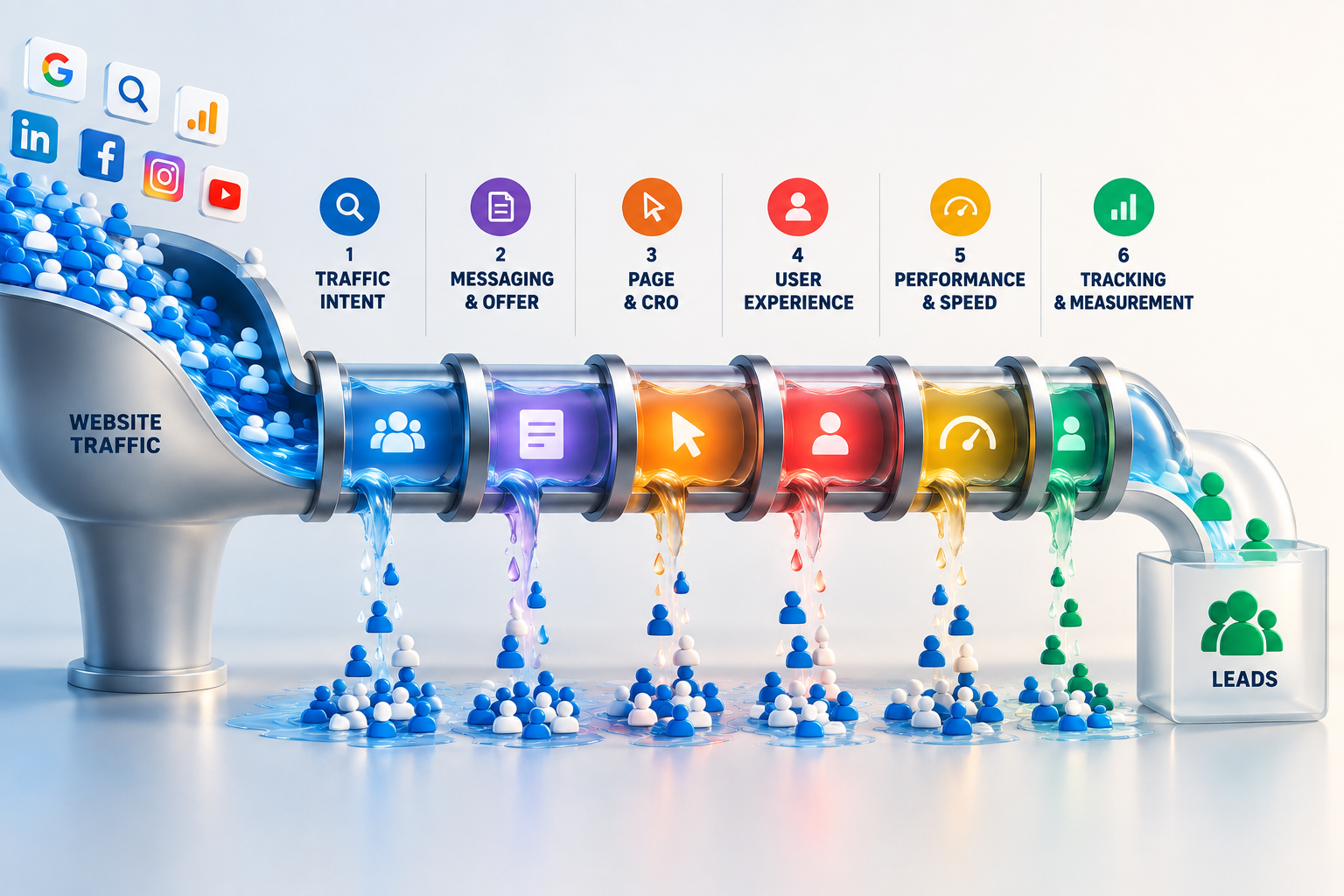
You do not need to fix all six. You need to identify the leak with the strongest evidence first.
You're Attracting Visitors, Not Potential Buyers
A traffic graph can look healthy while the underlying audience is wrong.
A page may rank for broad informational queries, attract visitors from irrelevant locations or receive clicks from people who are researching a topic rather than looking for a solution.
That traffic is not necessarily worthless. But traffic volume and buying intent are not the same thing.
Look at the terms bringing people to the site and which pages receive those visits.
Ask whether the visitors arriving actually resemble the audience the business is trying to reach.
If organic search is responsible for much of the traffic, examine whether rankings and keyword targeting are attracting people with the right intent.
Not sure whether your SEO is attracting the right audience?
Miranda offers an SEO audit that includes keyword and competitor analysis, providing another way to investigate whether organic visibility and targeting are aligned with the customers you actually want to reach.
Explore Miranda's SEO Audit →Visitors Don't Understand the Offer Fast Enough
Traffic can be relevant and still fail to generate leads when visitors cannot quickly understand what the business offers, who it helps or why the offer is worth considering.
A homepage can look polished while forcing people to interpret vague headlines such as “Solutions Built for Your Future” or “Helping Businesses Reach Their Potential.”
Those statements sound positive. They do not necessarily answer the questions a new visitor has.
They should quickly understand what you offer, who it is for and what problem it addresses.
The visitor should not need several minutes of investigation before understanding what to do next.
Adding more copy is not automatically the solution. Strong conversion copy reduces uncertainty. Headlines establish relevance. Supporting copy explains value. Proof strengthens credibility. Calls to action make the next step understandable.
Your traffic may be relevant. Is your message doing enough with it?
Iva offers conversion-focused landing page copywriting that includes audience research, messaging strategy and competitor research. If the offer is difficult to communicate clearly, specialist copy support can help examine the words behind the conversion journey.
Explore Iva's Conversion Copywriting Service →The Page Doesn't Create a Convincing Path to Action
Suppose the visitor is relevant and understands the offer.
There can still be another leak.
Important information might appear in the wrong order. Proof may arrive too late. Calls to action may compete with each other. A form may ask for too much information before enough trust has been established.
This is where the question changes from “Is the message clear?” to “Does the page help someone move from interest to action?”
Examine CTA hierarchy, information order and whether the page naturally guides visitors forward.
Look at proof placement, form complexity and whether the level of commitment makes sense.
People are engaging with the page but still not taking the next step?
Alexis offers conversion-focused auditing that examines elements such as the funnel, CTAs, forms and other potential conversion barriers.
Explore Alexis's CRO Audit →A clear offer is not enough if the experience between “I'm interested” and “I'll take the next step” creates unnecessary friction.
The Experience Creates Hesitation
CRO and UX overlap, but they are not identical problems.
A page can have the right offer and a prominent CTA while still being frustrating to use.
Navigation may be confusing. Mobile interactions may feel awkward. Important elements may compete for attention. A form may technically work but feel unnecessarily difficult.
One frustrating interaction may not destroy a conversion. Several of them can.
Complete the main journey on both desktop and an actual phone, without relying on your knowledge of the website.
Confusing navigation, unclear controls, trust concerns and difficult forms are all useful signals.
Nothing looks obviously broken, but the website still feels harder to use than it should?
Jordan's UX and conversion audit examines areas such as hierarchy, navigation, CTAs, trust, forms and mobile usability.
Explore Jordan's UX Audit →Technology Is Slowing Down Intent
Sometimes the visitor wants to continue.
The website gets in the way.
Slow loading, unstable layouts, heavy scripts, oversized images or poor mobile performance can introduce friction at exactly the moment someone is trying to evaluate an offer.
Performance should not be treated as an isolated score-chasing exercise. The useful question is:
Is technical performance making the conversion journey harder?
Check landing pages, service pages, lead forms and booking pages, not only the homepage.
Inspect layout shifts, heavy imagery, third-party scripts and mobile performance.
Speed is not a vanity metric for lead generation. In a study commissioned by Google and run by 55 and Deloitte across 37 brand sites, a 0.1-second faster mobile site was linked to a 21.6% increase in users reaching the form submission page on lead generation sites (Milliseconds Make Millions).
Is website performance adding friction to an otherwise strong journey?
Ken offers website speed and Core Web Vitals optimization. This becomes relevant when the evidence points toward technical performance rather than messaging or traffic acquisition.
Explore Ken's Website Performance Service →You're Measuring Traffic, Not the Journey
This is the leak that can distort every other diagnosis.
A business may know that thousands of people visited the website last month while being unable to answer which pages produced enquiries, which traffic sources produced qualified leads or how many people abandoned an important action.
Without reliable conversion measurement, optimization becomes guesswork.
It may be a contact form, booked call, demo request, quote request, phone call, registration or another high-intent action.
In Google Analytics 4, mark form submissions, booked calls and click-to-call as key events, then test each one yourself.
You can't fix a leak confidently if you can't see where people disappear.
Bappi specializes in GA4, Google Tag Manager and conversion tracking. This is relevant when the challenge is not simply generating traffic, but establishing reliable measurement of what visitors do after they arrive.
Explore Bappi's Analytics & Conversion Tracking Service →The Leak After the Form: Leads That Never Get a Follow‑Up
Sometimes the website is not the problem at all. People do fill in the form, download the guide or book a call, and then nothing useful happens for days.
Speed matters more than most businesses expect. A widely cited Harvard Business Review study of online leads found that companies that contacted a lead within an hour were seven times as likely to qualify it as those that waited even one hour longer, and more than 60 times as likely as those that waited 24 hours or more.
From the outside, this looks exactly like “traffic but no leads”. Inside, the leads existed. They simply went cold.
Submit your own form today and time the first reply, whether it is automatic or from a person.
If someone downloads a resource and hears nothing else, they forget why they signed up within days.
Turn new signups into conversations automatically
Our lead magnet email sequence guide gives you five ready-to-copy emails, exact timing and one simple branch for people who engage. It shows how to send the first reply instantly, so no lead waits.
See the 5-Email Follow-Up Sequence →If your follow-up emails land in spam, read why business emails go to spam before you send the next one.
Where Should You Investigate First?
Treat these as investigation signals rather than absolute diagnoses. Several leaks can exist at the same time.
Don't choose a specialist because their service sounds useful. Choose the problem for which you have the strongest evidence.
What Should You Fix First?
Use a controlled sequence instead of changing everything at once.
Verify
Make sure the basic journey, forms, CTAs and tracking actually work.
Diagnose
Identify the strongest evidence that points toward a particular leak.
Prioritize
Choose the issue most likely to affect meaningful conversions.
Fix
Make one meaningful improvement rather than redesigning everything.
Measure
Compare what happens after the change using meaningful conversion data.
Repeat
Move to the next highest-confidence problem and continue learning.
Website Traffic but No Leads: Common Questions
Why does my website get traffic but no leads?
Usually because one stage of the journey is leaking: the wrong visitors arrive, the offer is unclear, the page has no single obvious next step, the experience or speed creates friction, or leads happen but are not tracked. Test your own form first, then check which pages actually receive the traffic.
How do I know if my traffic is the wrong audience?
In Google Search Console, look at the queries and pages that bring visitors. If most visits come from informational searches, other countries or topics unrelated to what you sell, the problem is intent, not your contact form.
Should I run ads if my website is not generating leads?
Not yet. Ads send more people through the same journey. If that journey leaks, you pay to make the leak bigger. Fix the strongest leak first, confirm that leads are tracked, then use ads to scale what already works.
How do I track leads in Google Analytics 4?
Create events for the actions that count as a lead, such as a form submission, a booked call or a click on your phone number, and mark them as key events in GA4. Then complete each action yourself and confirm that it appears in the reports.
How fast should I follow up with a new lead?
As fast as possible, ideally within the hour. The Harvard Business Review study of online leads found that a one-hour delay sharply reduced the chance of qualifying a lead. An automatic first email sent instantly buys you time for a personal reply.
Do I need to hire a specialist to fix this?
Not always. The 10-minute check and the decision matrix above often reveal a fix you can make yourself, like a broken form or missing tracking. A specialist makes sense when the evidence clearly points to one leak that needs skills or time you do not have.
Don't Buy More Traffic Until You Know Where the Leak Is
More traffic can absolutely help a business grow.
But traffic acquisition works best when the website has a credible path from visit to action.
If your website already receives visitors but produces too few leads, resist the temptation to assume that traffic volume is the only problem.
Start with the journey.
Check whether the right people are arriving. Make sure they understand the offer. Examine the page structure and user experience. Test performance. Verify your measurement.
Then follow the evidence.
You may discover that one specific leak deserves attention long before the others.
Verify → diagnose → fix the highest-confidence leak → follow up fast → measure → repeat.