
The resource arrives late
If delivery depends on you checking your inbox, the subscriber’s attention has already moved on. The first email should arrive while the tab is still open.
Someone just downloaded your guide. A good lead magnet email sequence delivers it instantly, earns the second open, reacts to engagement and makes a clear offer, all without you sending a single email by hand. Below: the timing, five templates you can adapt and the exact workflow to automate it.
GetResponse currently offers a 14-day trial of premium features with no credit card required. Plan features and limits can change.
People rarely buy on the day they grab a checklist or guide. They download it while they are still figuring out the problem. What happens in their inbox over the next week or two (your lead magnet email sequence) decides whether that address ever becomes a customer.
If delivery depends on you checking your inbox, the subscriber’s attention has already moved on. The first email should arrive while the tab is still open.
No lead magnet email sequence, just one thank-you email and then silence. The subscriber forgets why they signed up, and your next newsletter feels like it came from a stranger.
The person who read your guide twice and the person who never opened it need different next steps. A fixed broadcast treats them as one.
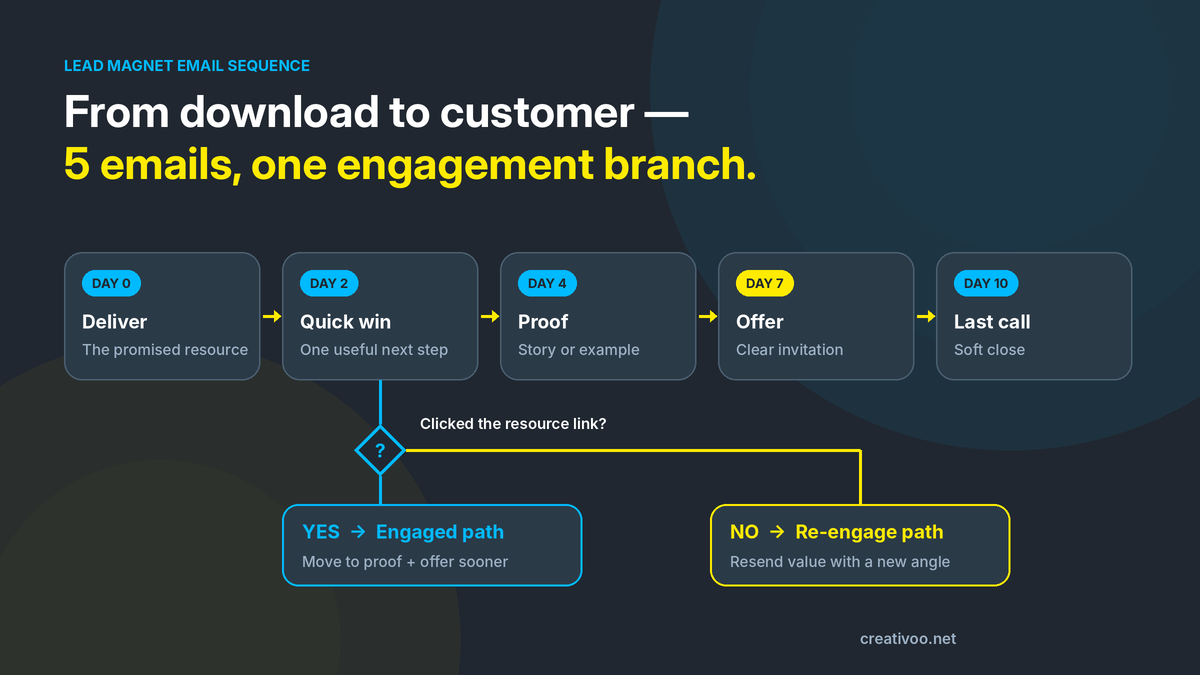
Five emails over ten days is a practical starting point: long enough to build trust, short enough that the original download is still remembered. Each email has one job, and each job prepares the next one. Copy this lead magnet email sequence structure first, then tune it with your own data.
Send the resource and tell them where to start.
One small action they can take with the resource today.
A short, real example of someone getting the result.
Your product, service or call, with a clear fit statement.
A short reminder, then a calm handoff to your regular emails.
Replace the highlighted placeholders with your own details. Keep each email short and focused on one action. That is what makes a lead magnet email sequence readable on a phone.
Hi [First name],
Here is the [resource] you asked for: [link].
If you only have five minutes, start with [section or page]. It is the part most people use first.
Over the next few days I will send a few short notes to help you put it to work. Reply anytime if something is unclear.
[Your name]
It delivers instantly, points to one starting place instead of the whole file, and sets the expectation that more useful emails are coming, which protects your next open.
Send: immediatelyHi [First name],
Most people download a guide and save it for later. Here is one thing you can do with it today: [specific action].
It takes about ten minutes and gives you [concrete result].
Have not opened it yet? Here is the link again: [link].
A small win turns the download into use. The link click is also your engagement signal: it decides which path each subscriber takes next.
Decision point after this emailHi [First name],
Quick story. [Customer] had the same problem the guide covers: [situation].
They changed one thing ([what they did]) and within [timeframe] they saw [result].
The same step is on page [x] of your guide.
Proof builds belief before you ask for anything. Use real, permissioned examples only; an invented testimonial damages trust far more than having none.
Send: 2 days after email 2Hi [First name],
If you want to go further than the guide, [offer] helps you [outcome] by [how it works].
It is a good fit if [fit]. It is probably not for you if [non-fit].
[Call to action link]
A clear fit and non-fit statement filters out the wrong buyers and makes the right ones more confident. One offer, one link, one action.
Send: 3 days after email 3Hi [First name],
I will keep this short. If [problem] is still on your list, [offer] is here: [link].
If it is not a priority right now, no problem. You will keep getting one useful [newsletter topic] email a [week], and you can unsubscribe anytime.
A soft close catches late deciders without pressure, then moves everyone else into your regular newsletter instead of pushing them toward unsubscribe.
Send: 3 days after email 4One condition is enough to make a lead magnet email sequence smarter: did the subscriber click the link in the quick-win email within two days? That single check separates people who are using your resource from people who have already forgotten it.
In any lead magnet email sequence, delivery, timing, reminders and the engagement check are the same for every subscriber. That is exactly what a workflow should run for you.
When someone replies with a real question or a high-value request, answer personally. Automation earns the conversation; it should not replace it.
GetResponse builds automation as visual workflows: a trigger starts the journey, then actions, waits and conditions move each contact to the next step. You can build and test this whole sequence during the 14-day premium trial before choosing a plan.
Set up a list for this lead magnet and a signup form or landing page that delivers the promise in its headline.
Use a subscription trigger so the workflow starts the moment someone joins that list through your form.
Add the delivery email as the first action, with no delay. Test that the resource link works on mobile.
Wait two days, then send the quick-win email with one clear link to track.
Check whether that link was clicked, then build the engaged and re-engage paths described above.
Subscribe with a test email, follow both paths and confirm timing before you send traffic to the form.
A linear autoresponder sends the same emails on a fixed schedule. The moment you add the engagement branch, you need conditions, and seeing the whole journey on one canvas makes it far easier to test, debug and improve.
Affiliate link · no card required to start the trial.
This is where most people pick the wrong plan. A full branched lead magnet email sequence needs more than one simple workflow, so check the automation limits, not just the contact price.
| What you need | 14-day trial | Free (after trial) | Starter | Marketer |
|---|---|---|---|---|
| Visual workflow builder | Yes, premium access | No, premium features end | Yes | Yes |
| Custom workflows | Build and test freely | Not available | 1 workflow | Unlimited |
| Elements per workflow | Full builder access | Not available | Up to 6 | No 6-element cap |
| Tags and scoring in workflows | Yes | Not available | Not available | Available |
| Fits this 5-email branched sequence | Yes, to build and test | No, keeps your list only | Partly, only as a shorter linear flow | Yes, in one workflow |
On Starter, a short linear version fits, for example the signup trigger, the delivery email, a wait, the quick-win email, a wait and the offer email. The full five emails plus the branch are what push you toward Marketer. Limits checked against GetResponse’s help center in October 2026: on Starter you can create one custom workflow with up to six elements, while Marketer and Creator allow unlimited custom workflows (GetResponse: workflow templates by plan). Plans and limits can change, so confirm before buying.
Use the 14-day trial to build the full lead magnet email sequence and see real engagement before you pay anything.
Starter can work if you trim the flow to six elements (the trigger plus delivery, quick win and offer emails, with a wait between each) and skip the branch.
If you plan several lead magnets, each with its own branched sequence, Marketer removes the workflow limit.
Your lead magnet already gets signups, you know what offer should follow it, and you can write the five emails above in an afternoon. Every week without automation is a week of downloads going cold.
Nobody is signing up yet, the lead magnet does not connect to anything you sell, or you are hoping automation will rescue a weak offer. It will only send a weak message faster.
Take your real lead magnet, paste in the five templates and connect the first condition of your lead magnet email sequence. In one sitting you will know whether automated follow-up fits the way you sell.
Build Your Sequence Free →Affiliate link. 14-day premium-feature trial, no credit card required to start.
It is a series of automated emails sent after someone downloads a free resource, such as a checklist, guide or template. The sequence delivers the resource, helps the subscriber use it, builds trust and then presents a relevant offer.
Four to six emails over one to two weeks is a common range. Five emails over ten days is a practical default: delivery, quick win, proof, offer and last call. Add more only when your buying cycle is long or your offer needs more explanation.
Immediately. The delivery email should arrive within moments of signup, while the person still remembers why they subscribed. A delay at this step lowers opens for every email that follows.
Treat that as a signal, not a failure. Add a condition after the quick-win email: those who did not click get a short re-engagement email with a different angle before they continue, and persistent non-openers move to your regular newsletter.
Partly. Starter allows one custom workflow with up to six elements, so only a shorter linear version fits there: delivery, quick win and offer, with waits between them. If you want the complete sequence in one workflow, or several lead magnets with their own sequences, Marketer is the better fit. Confirm current limits in your account.
Three things matter more than clever copy: a lead magnet that solves a narrow problem connected to what you sell, a first email that arrives instantly, and an offer that is the obvious next step after the resource. If the resource and the offer feel unrelated, even a well-written lead magnet email sequence will struggle. Measure clicks on the quick-win email and visits to the offer page; those two numbers show where the sequence leaks.
Yes, if the lead magnets attract different problems. A checklist for beginners and a template for experienced buyers bring in people at different stages, so the proof and offer emails should differ. Start with one lead magnet email sequence for your best-performing resource, then copy and adapt the workflow for the next one. On GetResponse, running several sequences side by side is where the Marketer plan’s unlimited workflows become useful.
Send from your own domain, authenticate it with SPF, DKIM and DMARC, and only email people who asked for the resource. Google’s email sender guidelines explain the requirements. If your emails already land in spam, read our guide on why business emails go to spam.
Related on Creativoo: if your lead magnet gets visits but almost no signups, the problem sits before the sequence. See Website Traffic but No Leads? Find the Conversion Leak.
If your leads also arrive by phone, the same follow-up logic applies to calls: Why Is Your Business Missing Customer Calls?
Affiliate disclosure: Creativoo may earn a commission if you become a paying GetResponse customer through the affiliate links on this page, at no extra cost to you. Our recommendations are based on relevance to the workflow described here, not on a guarantee of results.
GetResponse is a trademark of its respective owner. Creativoo is an independent publisher and affiliate participant and is not presented as GetResponse itself. Product features, pricing and availability may change; verify current terms on the provider’s website before making a purchase decision.
Privacy Policy Cookie Policy Terms Affiliate Disclosure Contact