
Shopify Store Not Converting? 10 Things to Check Before Buying More Traffic
Shopify store not converting despite getting traffic? Before increasing your ad budget, identify where potential customers are leaving the buying journey and which conversion problems deserve attention first.
More traffic won't repair a broken buying journey. It can simply send more people through the same conversion problems.
If your Shopify store is not converting, getting more visitors is only half the solution. The more important question is what happens to those visitors after they arrive.
When a Shopify store has traffic but no sales, the instinctive response is often to increase the ad budget, publish more social content, invest more heavily in SEO, or launch another campaign.
But more traffic does not automatically solve a conversion problem.
If potential customers are leaving because the offer is unclear, product pages create uncertainty, the mobile experience is frustrating, or checkout introduces unnecessary friction, sending more people into the same experience may simply make the problem more expensive.
Before investing heavily in additional traffic, use this Shopify conversion optimization audit to identify where the buying journey may be breaking.
Shopify Store Not Converting? First, Find the Leak
“My store gets traffic but doesn’t convert” describes the symptom. The funnel helps identify where the actual problem may be.
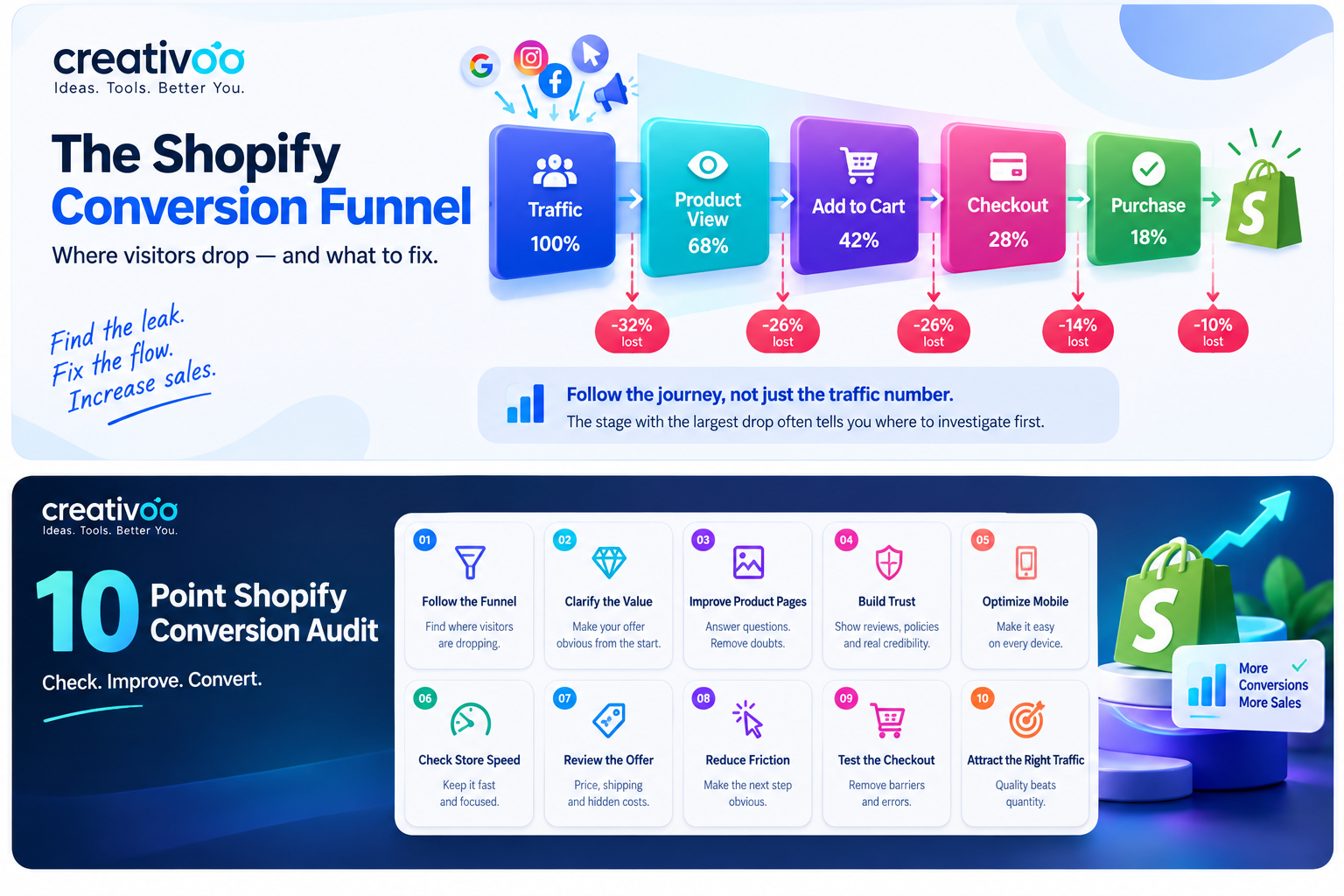
Start With the Conversion Funnel, Not the Traffic Number
A visitor normally moves through several stages: arriving on the store, viewing a product, adding it to the cart, reaching checkout and finally completing the purchase.
When a Shopify store is not converting, the useful question is not simply “Why aren't people buying?” It is “Where are they leaving?”
If visitors rarely reach product pages, navigation or traffic quality may be the problem. If products receive plenty of views but few add-to-carts, investigate the product page, pricing, offer, imagery and trust.
If customers add products to their carts but disappear during checkout, look more closely at shipping, payment options, checkout friction and unexpected costs.
Check Whether the Value Proposition Is Immediately Clear
A new visitor should not have to investigate your entire website to understand why your products deserve attention.
Visitors should understand
- What does this store sell?
- Who is it for?
- Why is the offer relevant?
Avoid vague messaging
Statements such as “quality products for everyone” say very little about why someone should choose your store.
A stronger value proposition communicates something specific: the customer, the problem, the product advantage, the use case, or another meaningful reason to care.
Audit Your Shopify Product Pages for Unanswered Questions
Product page optimization is particularly important when a Shopify store is not converting even though individual products are receiving meaningful traffic.
A product page is not simply a place to display a photograph and an Add to Cart button. It has to perform much of the work a salesperson would do in a physical store.
Then inspect the imagery. Can customers understand the product from several angles? Can they see important details? Does the presentation help them imagine owning or using it?
Depending on the product, demonstrations, video, close-ups, size references, multiple photographs or 3D views can answer questions that copy alone cannot.
Look for a Trust Problem
Visitors to an unfamiliar online store have to make several judgments quickly. Is the business legitimate? Will the product match the description? What happens if something goes wrong?
Avoid treating trust as a collection of random badges. Professional design combined with vague policies, weak product information or inconsistent messaging can still create doubt.
Test Your Shopify Store on a Phone Like a Real Customer
Do not evaluate your mobile store only from the Shopify editor or a desktop browser squeezed into a smaller window. Use an actual phone.
Open the store from the homepage, a collection page, an advertisement and a direct product link. Then try to complete a real purchase journey.
If customers want the product but the experience makes buying difficult, more advertising can amplify the friction instead of fixing it.
Check Shopify Store Speed Without Sacrificing the Experience
Every extra app, tracking script, animation, oversized image and third-party feature can add complexity to a storefront.
That does not mean every app is bad or that every store should be visually minimal. It means each element should justify the experience cost it creates.
Affiliate disclosure: Creativoo may earn a commission if you hire a service through the Fiverr links in this guide, at no additional cost to you.
Examine Pricing, Shipping and Unexpected Costs
Sometimes the website is not the main problem. A visitor may like the product and still decide that the total offer is not compelling enough.
Review the value
- Price versus realistic alternatives
- Benefits that justify the price
- What the customer actually receives
Review the surprises
- Shipping costs
- Delivery estimates
- Minimum-order requirements
- Late additional fees
Surprises near checkout can be especially damaging because the customer has already formed an expectation about the purchase. Research from the Baymard Institute puts the average documented cart abandonment rate at around 70%, and extra costs such as shipping, taxes and fees are the most common reason shoppers give for leaving checkout. If your Shopify store is not converting at the final step, this is one of the first places to look.
Make the Next Action Obvious
Customers should not need to solve a puzzle to buy something.
Review every important page and ask: What is the primary action I want someone to take here?
On a product page, Add to Cart should be easy to identify. On a collection page, browsing should feel natural. The homepage should guide visitors rather than present ten competing priorities.
Go Through Your Own Shopify Checkout
Store owners spend so much time inside the administration side of a website that they can forget what buying from it actually feels like.
Complete the process yourself. Add a product to the cart. Change the quantity. Remove it. Continue to checkout. Then repeat the journey on mobile.
Make Sure You Are Attracting the Right Visitors
When a Shopify store is not converting, traffic quality should be investigated alongside the store experience. Not all visitors have equal commercial intent.
A viral social post can generate thousands of visits from people who enjoy the content but have little interest in purchasing. A narrowly targeted search query may generate fewer visitors while bringing people much closer to a buying decision.
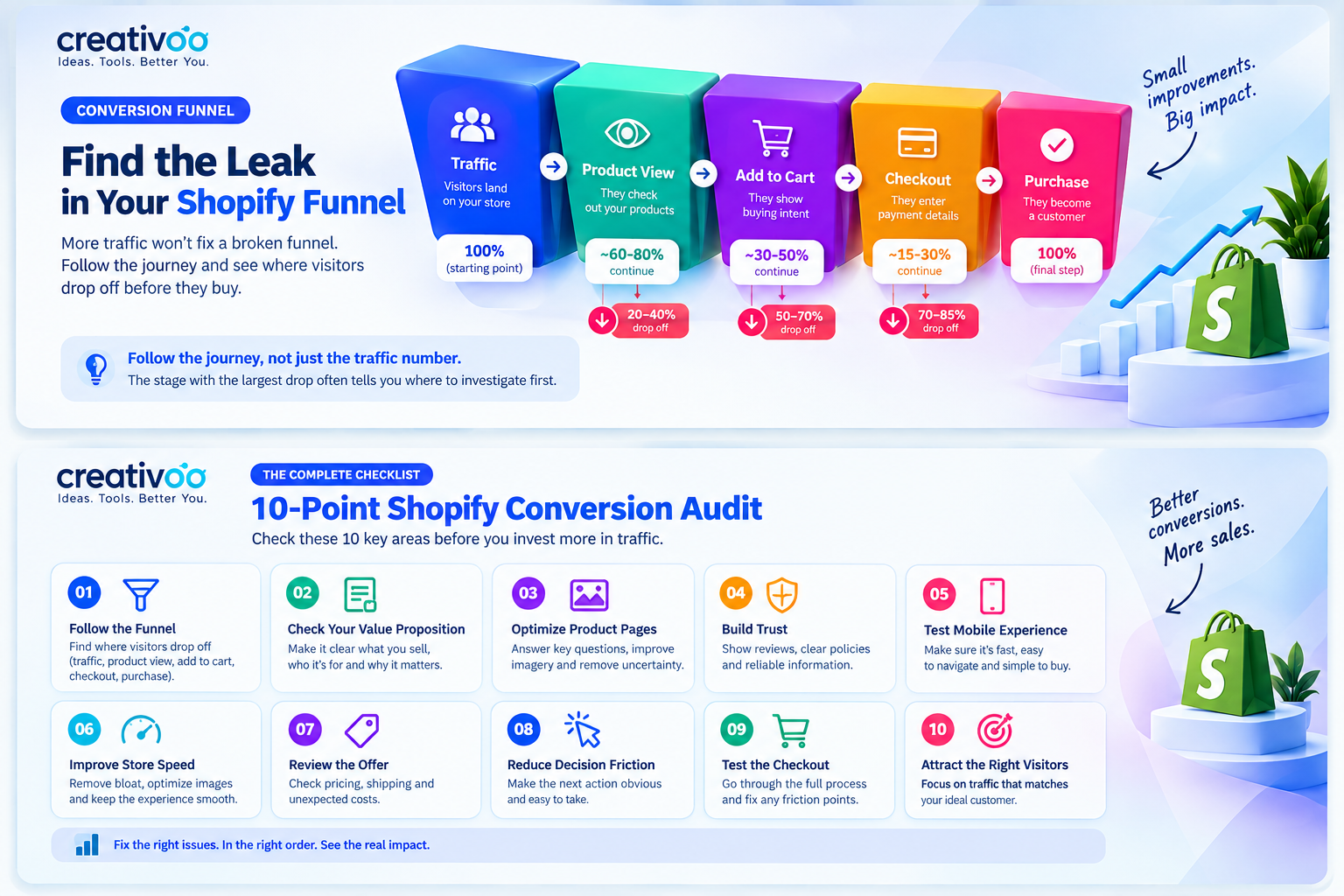
What Should You Fix First?
Prioritize every potential improvement using three filters.
Impact
If this problem is fixed, how much could it improve the customer journey?
Evidence
What analytics, customer behavior or feedback suggests this is a real problem?
Effort
How difficult, expensive or time-consuming will the change be to test?
For example, if analytics show strong product views but extremely weak add-to-cart activity, improving those product pages may deserve attention before redesigning the homepage.
If add-to-cart activity is healthy but shoppers disappear during checkout, investigate the final purchasing steps first.
Change one meaningful area, measure the result, learn from it and continue. That approach is more useful than changing the entire store at once and then trying to guess which modification affected the Shopify conversion rate.
Some Shopify Problems Need More Than Another DIY Experiment
Clearer copy, stronger product information and better photography can often be improved internally. But theme customization, responsive design, integrations, technical troubleshooting, performance work and custom storefront functionality may require specialized development expertise.
If technical Shopify store optimization is becoming the bottleneck, you can explore professionals who specialize in Shopify development.
Explore Shopify Development Professionals →Shopify Store Not Converting: FAQ
Why is my Shopify store not converting even with traffic?
Usually because visitors leave at one specific stage: they do not reach product pages, they view products but do not add to cart, or they add to cart and abandon checkout. Find the stage with the biggest drop first, then work through the matching checks in this guide.
How do I see where customers drop off in Shopify?
Open Analytics in your Shopify admin and look at the online store conversion data, which shows how many sessions added to cart, reached checkout and completed a purchase. The largest drop between two steps tells you where to investigate first.
What is a good conversion rate for a Shopify store?
There is no single good number. It varies widely by product, price, industry and traffic source. Compare your store against its own history and between traffic sources, and focus on improving the weakest stage of the funnel rather than chasing a published average.
Do Shopify apps slow down a store?
They can. Many apps load extra scripts on every page, and some leave code behind after you uninstall them. Remove apps you no longer use, then test your most important pages on a real phone.
Should I run more ads if my Shopify store isn't converting?
Not yet. More ads send more people into the same journey. Fix the biggest leak first, confirm the change improved add-to-cart or checkout completion, then scale traffic.
When should I hire a Shopify developer?
When the fix needs theme code, app conflicts, custom functionality or performance work that you cannot do safely yourself. Copy, product information and photography can often be improved in-house first.
More Traffic Is Powerful Only When Your Shopify Store Is Ready for It
Traffic acquisition and Shopify conversion optimization should not compete with each other. A healthy ecommerce business needs both.
But the order matters.
If your Shopify store is not converting despite already attracting visitors, understanding why those visitors do not progress toward a purchase can reveal opportunities that another advertising campaign cannot fix.
Start with the funnel. Find the largest point of friction. Improve it. Measure what happens. Then repeat.
Once the store does a better job of turning qualified visitors into customers, additional traffic has a much stronger foundation to work with.